How To Install PHP 7.4 on Debian 10 / Debian 9

How can I install PHP 7.4 on Debian 10 (Buster) / Debian 9 (Stretch)?. PHP is the most widely used server-side scripting language in creation of dynamic web pages. PHP applications usually work well with HTML and interact with relation database management systems. With each release of PHP, there are plethora of new features.

This installation of PHP 7.4 on Debian 10 / Debian 9 is available for production use. The GA release was made public on November 28, 2019. It is not recommended to run beta release in Production. It should be used for testing new features in PHP 7.4 and preparation for deprecated features.

Install PHP 7.4 on Debian 10 / Debian 9

Follow the steps covered below to install PHP 7.4 on Debian 10 & Debian 9 Linux distribution. The latest builds of PHP for Debian are available on SURY PHP PPA repository. We’ll add the repository as prerequisite then install PHP 7.4 on Debian 10 / Debian 9 from it.

Step 1: Update system

Ensure your system is updated:

sudo apt update
sudo apt upgrade -y && sudo reboot

Step 2: Add SURY PHP PPA repository

Download and store PPA repository in a file on your Debian Server/Desktop. But first, download GPG key.

sudo apt -y install lsb-release apt-transport-https ca-certificates 
sudo wget -O /etc/apt/trusted.gpg.d/php.gpg https://packages.sury.org/php/apt.gpg

Then add repository.

echo "deb https://packages.sury.org/php/ $(lsb_release -sc) main" | sudo tee /etc/apt/sources.list.d/php.list

Step 3: Install PHP 7.4 on Debian 10 / Debian 9

The last step is to Install PHP 7.4 on Debian 10 / Debian 9. Before installation, update system package list on added repositories.

sudo apt update

Then install  PHP 7.4 on Debian 10 / Debian 9:

sudo apt -y install php7.4

Answer yes when prompted to complete installation of PHP 7.4 on Debian 10 / Debian 9 Linux system.

Reading package lists... Done
Building dependency tree       
Reading state information... Done
The following additional packages will be installed:
  apache2 apache2-bin apache2-data apache2-utils libapache2-mod-php7.4 libapr1 libaprutil1 libaprutil1-dbd-sqlite3 libaprutil1-ldap libbrotli1
  libcurl4 libgdbm-compat4 libgdbm6 libjansson4 libldap-2.4-2 libldap-common liblua5.2-0 libnghttp2-14 libpcre2-8-0 libperl5.28 librtmp1
  libsasl2-2 libsasl2-modules libsasl2-modules-db libsodium23 libssh2-1 perl perl-modules-5.28 php-common php7.4-cli php7.4-common php7.4-json
  php7.4-opcache php7.4-readline psmisc ssl-cert
Suggested packages:
  apache2-doc apache2-suexec-pristine | apache2-suexec-custom www-browser php-pear libsasl2-modules-gssapi-mit | libsasl2-modules-gssapi-heimdal
  libsasl2-modules-ldap libsasl2-modules-otp libsasl2-modules-sql perl-doc libterm-readline-gnu-perl | libterm-readline-perl-perl make
  libb-debug-perl liblocale-codes-perl openssl-blacklist
The following NEW packages will be installed:
  apache2 apache2-bin apache2-data apache2-utils libapache2-mod-php7.4 libapr1 libaprutil1 libaprutil1-dbd-sqlite3 libaprutil1-ldap libbrotli1
  libcurl4 libgdbm-compat4 libgdbm6 libjansson4 libldap-2.4-2 libldap-common liblua5.2-0 libnghttp2-14 libperl5.28 librtmp1 libsasl2-2
  libsasl2-modules libsasl2-modules-db libsodium23 libssh2-1 perl perl-modules-5.28 php-common php7.4 php7.4-cli php7.4-common php7.4-json
  php7.4-opcache php7.4-readline psmisc ssl-cert
The following packages will be upgraded:
  libpcre2-8-0
1 upgraded, 36 newly installed, 0 to remove and 7 not upgraded.
Need to get 15.0 MB of archives.
After this operation, 76.9 MB of additional disk space will be used.
Do you want to continue? [Y/n] y

Use the next command to install additional packages:

sudo apt-get install php7.4-xxx

Example:

sudo apt-get install php7.4-{bcmath,bz2,intl,gd,mbstring,mysql,zip}

PHP configurations related to Apache is stored in /etc/php/7.4/apache2/php.ini

Using PHP with Nginx:

The installation of php on Debian configures Apache. For users interested in running Nginx and PHP, you need to stop and disable Apache service.

sudo systemctl disable --now apache2

Then install fpm extension and nginx packages.

sudo apt-get install nginx php7.4-fpm

PHP FPM configuration files are located in the directory: /etc/php/7.4/fpm/

The nginx and php-fpm services should be running.

$ systemctl status php7.4-fpm nginx
● php7.4-fpm.service - The PHP 7.4 FastCGI Process Manager
   Loaded: loaded (/lib/systemd/system/php7.4-fpm.service; enabled; vendor preset: enabled)
   Active: active (running) since Thu 2019-09-19 17:32:26 UTC; 14s ago
     Docs: man:php-fpm7.4(8)
 Main PID: 12151 (php-fpm7.4)
   Status: "Processes active: 0, idle: 2, Requests: 0, slow: 0, Traffic: 0req/sec"
    Tasks: 3 (limit: 2377)
   Memory: 14.7M
   CGroup: /system.slice/php7.4-fpm.service
           ├─12151 php-fpm: master process (/etc/php/7.4/fpm/php-fpm.conf)
           ├─12152 php-fpm: pool www
           └─12153 php-fpm: pool www

Sep 19 17:32:26 deb10 systemd[1]: Starting The PHP 7.4 FastCGI Process Manager...
Sep 19 17:32:26 deb10 systemd[1]: Started The PHP 7.4 FastCGI Process Manager.

● nginx.service - A high performance web server and a reverse proxy server
   Loaded: loaded (/lib/systemd/system/nginx.service; enabled; vendor preset: enabled)
   Active: active (running) since Thu 2019-09-19 17:32:27 UTC; 12s ago
     Docs: man:nginx(8)
 Main PID: 12362 (nginx)
    Tasks: 2 (limit: 2377)
   Memory: 3.2M
   CGroup: /system.slice/nginx.service
           ├─12362 nginx: master process /usr/sbin/nginx -g daemon on; master_process on;
           └─12363 nginx: worker process

Sep 19 17:32:27 deb10 systemd[1]: Starting A high performance web server and a reverse proxy server...
Sep 19 17:32:27 deb10 systemd[1]: nginx.service: Failed to parse PID from file /run/nginx.pid: Invalid argument
Sep 19 17:32:27 deb10 systemd[1]: Started A high performance web server and a reverse proxy server.

Enjoy your websites and Web Applications development with PHP 7.4 on Debian 10 / Debian 9 Linux system.

Crédits: https://computingforgeeks.com/how-to-install-latest-php-on-debian/
Publicado em Dicas, Linux | Deixe o seu comentário

How to Switch between Multiple PHP Version on Debian 11/10

On your system, if you have installed multiple versions of PHP (eg PHP 8.1, 8.0, 7.4, 7.3, 7.2, 7.1 and 5.6). PHP 7.2 is running as default PHP for Apache and CLI. For any requirement, you need to use PHP 5.6. Then you don’t need to remove PHP 7.2. You can simply switch your PHP version to default used for Apache and command line.

We assume you have installed multiple PHP version on your Debian system. Now you need to switch the active PHP version for CLI and Apache2. This tutorial will help you to switch between multiple PHP versions for Apache server and CLI on Debian.

We have installed PHP 8.1, PHP 7.4 and PHP 5.6 on our Debian system. You can use the same for other PHP versions by changes commands accordingly.

Enable PHP 8.1 as Default Version

You need to set PHP 8.1 as your active PHP version for CLI and Apache2 both. You can do this by disabling Apache2 modules for all other installed PHP versions and configure CLI using the update-alternatives command.

For Apache:-
Run the following command to disable Apache module for other PHP versions.

sudo a2dismod php7.4 php5.6 

Now, enable PHP 8.1 module in Apache server.

  • sudo a2enmod php8.1  sudo service apache2 restart 
  • For Command Line Interface:-
    sudo update-alternatives --set php /usr/bin/php8.1  sudo update-alternatives --set phar /usr/bin/phar8.1  sudo update-alternatives --set phar.phar /usr/bin/phar.phar8.1  sudo update-alternatives --set phpize /usr/bin/phpize8.1  sudo update-alternatives --set php-config /usr/bin/php-config8.1 

Note – The phpize8.1 and php-config8.1 command is available in php8.1-dev package. This is more useful for compiling PHP modules using pecl.

Enable PHP 7.4 as Default Version

You need to set PHP 7.4 as your active PHP version for CLI and Apache2 both. You can do this by disabling Apache2 modules for all other installed PHP versions and configure CLI using the update-alternatives command.

  • Apache:-
    Run the following commands to disable Apache module for other PHP versions
  • sudo a2dismod php8.1 php5.6 

    Now, enable PHP 7.4 module in Apache server.

    sudo a2enmod php7.4  sudo service apache2 restart 
  • Command Line Interface:-
    sudo update-alternatives --set php /usr/bin/php7.4  sudo update-alternatives --set phar /usr/bin/phar7.4  sudo update-alternatives --set phar.phar /usr/bin/phar.phar7.4  sudo update-alternatives --set phpize /usr/bin/phpize7.4  sudo update-alternatives --set php-config /usr/bin/php-config7.4 

Note – The phpize7.4 and php-config7.4 command is available in php7.4-dev package. This is more useful for compiling PHP modules using pecl.

Enable PHP 5.6 as Default Version

The developers of PHP are no longer supporting PHP 5.6. It is strongly recommended to upgrade to higher PHP version like 7.4 or 8.1. But still you can install and Use php 5.6 on your Debian system if your application required PHP 5.6. Let’s set PHP 5.6 as your default version for CLI and Apache2 both.

  • Apache:-
    Run the following commands to disable other PHP versions like (php 8.1, php7.4 etc) for Apache and command line.

    sudo a2dismod php7.4 php8.1 php8.0 

    Now, enable PHP 5.6 module in Apache server.

    sudo a2enmod php5.6  sudo service apache2 restart 
  • Command Line:-
    sudo update-alternatives --set php /usr/bin/php5.6  sudo update-alternatives --set phar /usr/bin/phar5.6  sudo update-alternatives --set phar.phar /usr/bin/phar.phar5.6   sudo update-alternatives --set phpize /usr/bin/phpize5.6  sudo update-alternatives --set php-config /usr/bin/php-config5.6 

Note – The phpize5.6 and php-config5.6 command is available in php5.6-dev package. This is more useful for compiling PHP modules using pecl.

Conclusion

In this tutorial, you have learned about switching PHP versions on Debian system. You can change the default PHP version without uninstalling the other versions.

Publicado em Dicas, Linux | Deixe o seu comentário

How To Switch Between Multiple PHP Versions In Ubuntu

Introduction

Sometimes, the most recent version of an installed package might not work as you expected. Your application may not compatible with the updated package and support only a specific old version of package.

In such cases, you can simply downgrade the problematic package to its earlier working version in no time. Refer our old guides on how to downgrade a package in Ubuntu and its variants here and how to downgrade a package in Arch Linux and its derivatives here.

In some situations, you need not to downgrade the problematic packages. In Linux, we can use multiple versions of the same package at the same time, side by side.

For instance, let us say you are testing a PHP application in LAMP stack deployed in Ubuntu 18.04 LTS. After a while you find out that the application worked fine in PHP 5.6, but not in PHP 7.2 (Ubuntu 18.04 LTS installs PHP 7.x by default).

Are you going to reinstall PHP or the whole LAMP stack again? Not necessary.

You don’t even have to downgrade the PHP to its earlier version. You can simply switch to the previous working PHP version in couple minutes.

1. Switch Between Multiple PHP Versions

Let us check the default installed version of PHP using command:

$ php -v

Sample output:

PHP 7.2.7-0ubuntu0.18.04.2 (cli) (built: Jul 4 2018 16:55:24) ( NTS )
Copyright (c) 1997-2018 The PHP Group
Zend Engine v3.2.0, Copyright (c) 1998-2018 Zend Technologies
with Zend OPcache v7.2.7-0ubuntu0.18.04.2, Copyright (c) 1999-2018, by Zend Technologies

As you can see, the installed version of PHP is 7.2.7.

After testing your application for couple days, you find out that your application doesn’t support PHP 7.2. In that case, it is a good idea to have both PHP 5.x version and PHP 7.x version, so that you can easily switch between any supported version at any time.

You don’t need to remove PHP 7.x or reinstall LAMP stack. You can use both PHP 5.x and 7.x versions together.

I assume you didn’t uninstall php 5.6 in your system yet. Just in case, you removed it already, you can install it again using a PPA like below.

You can install PHP 5.6 from a PPA:

$ sudo add-apt-repository -y ppa:ondrej/php
$ sudo apt update
$ sudo apt install php5.6

1.1. Switch from PHP 7.x to PHP 5.x

1.1.1 First disable PHP 7.2 module using command:

$ sudo a2dismod php7.2

Sample output:

Module php7.2 disabled.
To activate the new configuration, you need to run:
systemctl restart apache2

1.1.2. Next, enable PHP 5.6 module:

$ sudo a2enmod php5.6

1.1.3 Set PHP 5.6 as default version using command:

$ sudo update-alternatives --set php /usr/bin/php5.6

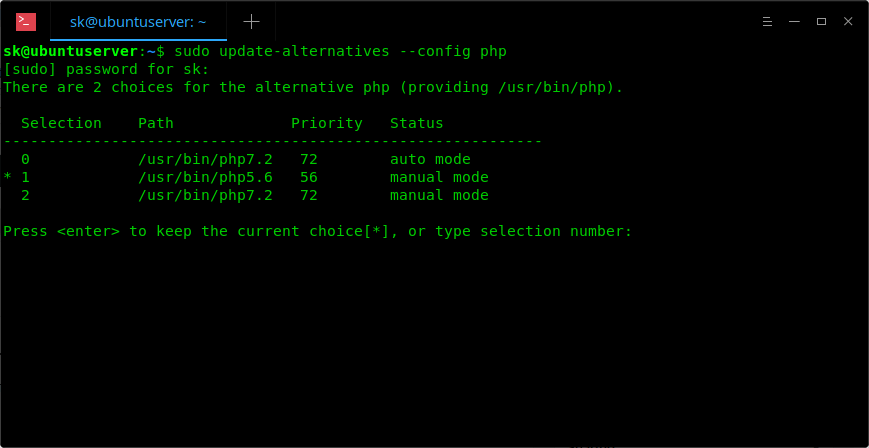
1.1.4. Alternatively, you can run the following command to set which system wide version of PHP you want to use by default.

$ sudo update-alternatives --config php

1.1.5. Enter the selection number to set it as default version or simply press ENTER to keep the current choice.

Change PHP default version

1.1.6. If you have installed other PHP extensions, set them as default as well.

$ sudo update-alternatives --set phar /usr/bin/phar5.6

1.1.7. Finally, restart your Apache web server:

$ sudo systemctl restart apache2

Now, check if PHP 5.6 is the default version or not:

$ php -v

Sample output:

PHP 5.6.37-1+ubuntu18.04.1+deb.sury.org+1 (cli) 
Copyright (c) 1997-2016 The PHP Group
Zend Engine v2.6.0, Copyright (c) 1998-2016 Zend Technologies
with Zend OPcache v7.0.6-dev, Copyright (c) 1999-2016, by Zend Technologies

2. Switch from PHP 5.x to PHP 7.x

Likewise, you can switch from PHP 5.x to PHP 7.x version by running the following commands one after another.

$ sudo a2enmod php7.2
$ sudo a2dismod php5.6
$ sudo update-alternatives --set php /usr/bin/php7.2
$ sudo systemctl restart apache2

Crédits: https://ostechnix.com/how-to-switch-between-multiple-php-versions-in-ubuntu/

Publicado em Dicas, Linux | Deixe o seu comentário

Descubra quanto tempo de vida resta ao seu SSD!

A maioria dos computadores hoje em dia vêm com solid state drives, também conhecidas por SSD. Isto porque são mais rápidas, mais pequenas e mais eficientes do que os discos rígidos (HDDs). No entanto são também mais caros. Mas há outra coisa que as distingue dos discos mais tradicionais. Todos os SSDs têm uma vida útil limitada devido aos ciclos de escrita. Vamos explicar-lhe como descobrir quanto tempo de vida resta ao SSD!

Descubra quanto tempo de vida resta ao seu SSD!

Ao contrário de um HDD, um SSD tem um número limitado de possíveis escritas antes que a unidade passe apenas a modo de leitura. Isto deve-se à forma como o hardware foi desenvolvido. Afinal de contas o aumento de velocidade tem um preço.

ssd

Mas a questão é que a maioria dos utilizadores não tem de se preocupar com isto. Na prática são precisos vários anos para ficar sem ciclos de escrita. No entanto é sempre boa ideia estarmos atentos. Assim se está curioso sobre quantos anos ainda restam ao SSD, há formas de estimar isso mesmo.

Em média, um SSD moderno sobrevive até que tenha escrito cerca de 700TB de dados ao longo da sua vida. Alguns podem sobreviver mais tempo, alguns menos. Esta é apenas a média. Com esta informação podemos estiver o tempo de vida restante.

Uma aplicação muito útil

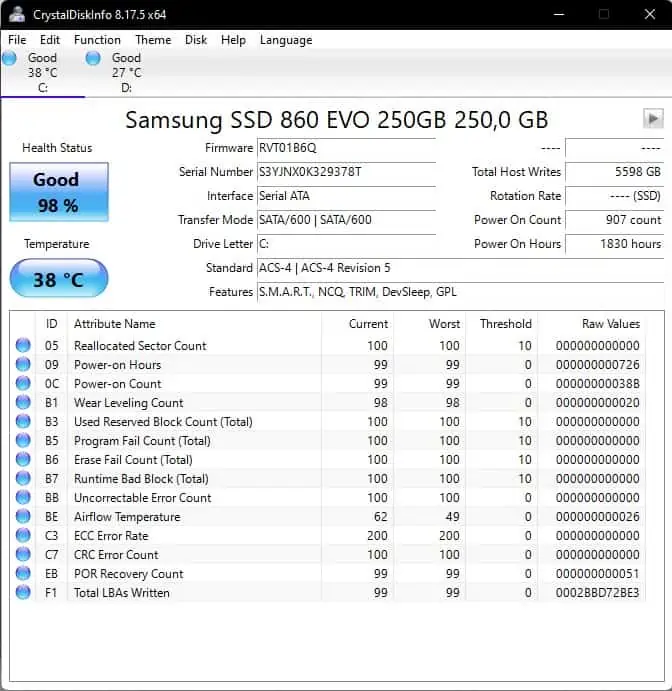
O CrystalDiskInfo é um pequeno programa muito útil que pode usar para estimar o tempo de vida restante do SSD. É muito útil e totalmente grátis.

tempo de vida ssd

Instale e lance o CrystalDiskInfo. Depois olhe para o Status de Saúde. Se disser Saudável (Good), então não tem nada com que se preocupar. No entanto, se disser Cuidado (Caution), significa que o SSD está a degradar-se e deve fazer o back up dos seus ficheiros e substituí-lo antes que seja tarde demais. Se disser Mau (Bad), a vida da SSD acabou, e tem muita sorte se ele ainda não falhou.

Entretanto veja no canto superior direito a linha Total Host Writes (ou pode ser apenas Host Writes dependendo da sua versão). Isto é o número total de dados que já foram escritos nesta unidade.

tempo de vida ssd

Se estiver à volta da marca dos 400TB, por exemplo, então sabe que está a mais de metade do tempo de vida do dispositivo. Entretanto à medida que se aproxima dos 700TB, vai querer pensar em arranjar uma unidade de reserva, por precaução. Mas, sinceramente, ainda deverá durar alguns anos.

A aplicação está disponível para download aqui.

Seja como for uma vez que os SSDs não têm peças móveis, são muito fiáveis. Na verdade, a maioria dos SSDs pode durar mais de cinco anos e alguns podem mesmo ultrapassar os dez.

Fonte: https://www.leak.pt/tempo-de-vida-ssd/

Publicado em Dicas | Deixe o seu comentário

Cidadão Ciberseguro – Documentação Geral

Documentação – Cidadão Ciberseguro

Publicado em Dicas | Deixe o seu comentário

Partilhar ou não partilhar fotos dos filhos nas redes sociais?

whatsapp facebook messenger linkedin twitter facebook

A Internet pode ser usada de forma inspiradora ou destruidora. A PSP alerta os pais para a publicação de fotos dos filhos nas redes sociais. Há riscos nessas partilhas. A exposição traz perigos. É necessário refletir antes de mostrar imagens ao mundo.

Há alguns anos, a PSP lançava uma campanha de alerta e sensibilização na sua página do Facebook. “Será mesmo necessário publicar fotos com as caras das suas crianças de forma ostensiva? Proteja-se e pense duas vezes antes de postar uma imagem nas redes sociais.” Era esta a chamada de atenção. A PSP usava propositadamente uma rede social para avisar os pais dos perigos dessa ferramenta digital. Em português e em inglês. “Não publique caras de crianças. Não mencione nomes e locais. Não arrisque aqui. A decisão é sua. A melhor forma de o proteger é evitar que apareça aqui para sempre.” Os recados estavam dados.

A campanha das autoridades policiais surgiu dias depois de ser conhecida a decisão do Tribunal da Relação de Évora que proibia um ex-casal de publicar uma foto da filha de 12 anos nas redes sociais. O caso foi parar ao tribunal no âmbito de um processo de regulação de responsabilidades parentais. “Os filhos não são coisas ou objetos pertencentes aos pais”, referiam os juízes na decisão judicial.

Partilhar com peso e medida, com sensibilidade e bom senso e com uma série de recomendações de segurança na cabeça. É preciso conhecer os riscos. E os perigos são vários. Tito de Morais, fundador de MiudosSegurosNa.Net, tece várias considerações sobre o assunto e alerta para diversos fatores que não podem passar despercebidos. Desde logo, essas partilhas implicam a criação de uma pegada digital que é controlada por terceiros e que é difícil de alterar. E uma vez na net, para sempre na net, o que pode ter um impacto negativo, sobretudo na pré-adolescência e adolescência, mas também na vida adulta.

As fotos podem ser manipuladas. “As imagens podem ser alvo de ‘clonagem digital’ e usadas por terceiros como se dos filhos deles se tratassem, satisfazendo fantasias de pessoas com problemas emocionais ou de saúde mental ou até visando ser usadas em esquemas fraudulentos de obtenção de donativos, etc.”, refere o especialista. “As imagens podem ser adicionadas a redes ou grupos integrados por pedófilos e predadores sexuais que olham para elas não com carinho ou ternura, mas como objeto de desejo sexual, de troca e até de comércio entre eles”, acrescenta Tito de Morais.

Os dados podem ser descontextualizados, as imagens podem ser usadas para humilhar ou ofender as crianças e os seus pais e familiares. As localizações podem colocar em risco ou potenciar contactos presenciais indesejáveis. Pensar antes de publicar é o primeiro passo. “A sua ponderação e utilização de abordagens regulamentares, educacionais, parentais e tecnológicas podem contribuir para que a utilização da Internet seja feita de uma forma ética, responsável e segura”, comenta.

Refletir. Refletir. Refletir.

Que cuidados ter nessas partilhas? Pensar, refletir. Vale mesmo a pena publicar? Acrescentam alguma coisa? E onde publicar? Pensar, refletir, mais uma vez. Se a decisão é publicar, é necessário remover todos os metadados. “As máquinas fotográficas (incluindo as dos telemóveis) acrescentam a mais diversa informação às fotografias, que geralmente não é vista pelos utilizadores, mas está contida nos ficheiros das imagens e é acessível a terceiros. Essas informações podem incluir dados de geolocalização onde as fotos são tiradas. Antes de publicar essas fotos, convém eliminar essa informação.”

Evitar publicações públicas, que todas as pessoas possam ver. Este mundo tem muitas possibilidades, muitos caminhos, muitos perigos. “Há plataformas de blogues e plataformas de partilha de fotos e vídeos que permitem o acesso a publicações apenas mediante password (mas convém pensar que estas podem ser partilhadas). Numa rede social posso publicar apenas para amigos (mas quer que todos os amigos vejam?)”.

No Facebook, é possível excluir pessoas para que não vejam uma determinada publicação, deixando que outras vejam. Também no Facebook, é possível criar um grupo secreto para publicar fotos de família, mas é preciso ser criterioso com quem se convida. E é sempre possível criar uma rede social fechada de cariz familiar numa plataforma como o Ning, em que só tem acesso a essa rede quem se quer.

A erosão do público e privado

Nada é verdadeiramente proibido na Internet, mas há fotos que não são mesmo para publicar, já que existe sempre o risco de fugirem ao controlo. “São disso exemplo fotos de crianças nuas, com dados de geolocalização, com uniformes ou outros indicadores que as coloquem em locais físicos que habitualmente frequentam, em alta resolução, de outras crianças que não as suas (a menos que tenha autorização expressa dos respetivos pais) e fotos que possam embaraçar a criança no futuro”, refere.

Tito de Morais dá mais conselhos sobre as fotos a evitar publicar na Internet em geral e nas redes sociais em particular. Fotos de crianças nuas, seja no banho seja na praia. “Infelizmente há quem olhe para essas fotos inocentes como um objeto de desejo.” Fotos de outras crianças sem autorização. “Se há pais que não se importam, outros são zelosos da privacidade dos seus filhos. Temos de respeitar uns e outros.” Fotos que associem uma criança a uma escola, a um ATL, a espaços que habitualmente frequenta. Fotos com o nome completo da criança, etiquetas de mochilas, pautas da escola. Fotos que as crianças não queiram que sejam publicadas. Fotos de hoje poderão ser embaraçosas no futuro. “A criança no pote é um clássico.”

O especialista está habituado a abordar o assunto e a dar conselhos nesta área. Ficam algumas sugestões. Pesquisar. “Tudo o que publicamos ou publicam sobre nós na Internet é muito fácil de procurar e encontrar.” Replicar. “Tudo o que publicamos ou publicam sobre nós na Internet é muito mais fácil de copiar, duplicar, replicar.” E pode chegar a um número maior de pessoas do que se poderia imaginar, às chamadas audiências invisíveis. Há ainda o risco de descontextualização, de uma imagem ou um texto adquirirem significados completamente diferentes dos inicialmente pensados.

Contextos colapsados. “Contrariamente ao que acontece nas redes sociais tradicionais, em que o que dizemos e fazemos é condicionado pelos contextos em que estamos (os locais, as pessoas e as circunstâncias condicionam o nosso comportamento), nas redes sociais, esses contextos tendem a esbater-se e a deixar de existir.” A erosão do que é público e do que é privado está sempre presente. A realidade que é mostrada é parcelar, os juízos de valor assentam em pedaços da realidade exibida, e clicar em “Gosto” ou “Partilhar” é demasiado imediato, sem tempo para maturar o que se vê e lê. A comunicação mediada pela tecnologia pode potenciar equívocos e mal-entendidos porque não é presencial.

“Esta comunicação mediada também tende a impedir-nos de ver o efeito da mesma nos nossos interlocutores, que, muitas vezes, nem sabemos quem são, e tal pode funcionar como um desinibidor que nos leva a dizer e a fazer coisas que presencialmente não diríamos ou não faríamos”, sublinha o fundador de MiudosSegurosNa.Net.

Sara R. Oliveira

Artigo originalmente publicado no Educare.pt
Publicado em Redes Socais | Deixe o seu comentário

Kits de Aprendizagem

Kits de Aprendizagem:

https://www.incode2030.gov.pt/kits-de-aprendizagem


Rede TIC e Sociedade

INCLUSÃO E LITERACIA DIGITAL

Os recursos didáticos da Rede TIC e Sociedade foram concebidos para um primeiro passo de familiarização às TIC.


Projeto Literacia Digital de Adultos

PROJETO LITERACIA DIGITAL DE ADULTOS

Um e-book gratuito com propostas de atividades que promovem a literacia e a inclusão digitais de adultos.


Internet Segura - Recurso Educativo

INTERNET SEGURA – RECURSO EDUCATIVO

O Centro Internet Segura disponibiliza um recurso educativo para promover uma utilização segura da Internet.


Plataforma de Acessibilidade

PLATAFORMA DE ACESSIBILIDADE

Esta Plataforma disponibiliza tutoriais que permitem a produção de conteúdos acessíveis a todos.


Mild - Manual de Instruções para a Literacia Digital

MILD – MANUAL DE INSTRUÇÕES PARA A LITERACIA DIGITAL

Destina-se à aquisição de competências nos domínios da leitura, dos media e da cidadania digitais para os jovens (15-18 anos).


Projeto Made With Code

PROJETO MADE WITH CODE

Um Projeto que tem como o objetivo incentivar a participação e a representação das raparigas nas TIC.


Rede ObLID - Campanha de Informação

REDE OBLID – CAMPANHA DE INFORMAÇÃO

Uma animação para perceber o funcionamento das receitas sem papel.


União Europeia – Espaço de Aprendizagem

UNIÃO EUROPEIA – ESPAÇO DE APRENDIZAGEM

Material didático para ajudar a descobrir a UE (5 aos 15+ anos)


ZigZaga na Net

ZIGZAGA NA NET

Podcast sobre segurança na net para crianças (5 aos 12 anos)


Cartão Ciberseguro

CARTÃO CIBERSEGURO

Centro Nacional de Cibersegurança – Plataforma NAU


CODERDOJO

CODERDOJO

Rede global gratuita, liderada por voluntários, de clubes de comunidade que facilitam o acesso a competências digitais a jovens.


Educação

Scratch

SCRATCH

Para criar histórias, jogos e animações.


REDA - Recursos Educativos Digitais Abertos

REDA – RECURSOS EDUCATIVOS DIGITAIS ABERTOS

Plataforma dedicada à disponibilização de conteúdos educativos para a comunidade escolar.


Khan Academy

KHAN ACADEMY

Uma Academia de aprendizagem com conteúdos como matemática, ciências e engenharia ou computação (selecionar a opção Português).


Digital Schools Europe

DIGITAL SCHOOLS EUROPE

Estão disponíveis os seguintes cursos: Digital Technologies in the ClassroomSchool Management Planning – Becoming a DSoE SchoolTraining course for Validators of Digital Schools of EuropeUniversal Design for Learning meeting Special Education Needs.


Go Lab

GO LAB

São disponibilizadas várias apps que ajudam os estudantes na sua aprendizagem.


European Schoolnet Academy

EUROPEAN SCHOOLNET ACADEMY

Os cursos da European Schoolnet Academy oferecem uma introdução a conceitos pedagógicos inovadores, assim como ferramentas e recursos para o ensino do dia-a-dia.


Qualificação

Class Central

CLASS CENTRAL

Mais de 2 mil MOOC gratuitos nas áreas das TIC.

Publicado em Dicas | Deixe o seu comentário

Thoughts on Open Education

Directory of OER repositories

See the directory here:

Name: Academic Earth
URL: http://academicearth.org/
Country: United States

Name: African Health OER Network
URL: http://www.oerafrica.org/healthoer
Country: Kenya

Name: Aljazeera creative commons repository
URL: http://cc.aljazeera.net/
Country: Qatar

Name: Almae Matris Studiorum Campus
URL: http://campus.unibo.it/
Country: Italy

Name: Ariadne
URL: http://www.ariadne-eu.org/
Country: European Union

Name: Banco de iten
URL: http://bi.gave.min-edu.pt/
Country: Portugal

Name: Banco de Objetos de Aprendizaje
URL: http://aplicaciones.virtual.unal.edu.co/drupal/?q=node/34
Country: Colombia

Name: Banco Internacional de Objetos Educacionais
URL: http://objetoseducacionais2.mec.gov.br
Country: Brazil

Name: Centro de Recursos para la Enseñanza y el Aprendizaje (CREA)
URL: http://www.crea.udg.mx/
Country: Mexico

Name: CChemCollective
URL: http://www.chemcollective.org/
Country: United Stated

Name: Commonwealth of Learning
URL: http://www.col.org/
Country: Canada

Name: Connexions
URL: http://cnx.org/
Country: United States

Name: Consortium for the Advancement of Undergraduate Statistics Education
URL: http://www.causeweb.org
Country: United States

Name: CSTC (Computing Science Teaching Center)
URL: http://www.cstc.org/
Country: United States

Name: Culturally Authentic Pictorial Lexicon
URL: http://capl.washjeff.edu
Country: United States

Name: Curriki
URL: http://welcome.curriki.org/
Country: United States

Name: Desarrolla, Aprende y Reutiliza (DAR)
URL: http://catedra.ruv.itesm.mx/
Country: Mexico

Name: Digiref
URL: http://www.digiref.se/index.php
Country: Sweden

Name: Digital Library for Earth System Education
URL: http://www.dlese.org/library/
Country: United States

Name: DUDA dk
URL: http://www.duda.dk
Country: Denmark

Name: Economics Network Online Learning and Teaching Materials
URL: http://www.economicsnetwork.ac.uk/links/othertl.htm
Country: United Kingdom

Name: Edu Fi
URL: http://www.edu.fi
Country: Finland

Name: Educar Chile
URL: http://www.educarchile.cl
Country: Chile

Name: Eduteka
URL: http://www.eduteka.org/
Country: Colombia

Name: eGyankosh
URL: http://www.egyankosh.ac.in/
Country: India

Name: EMU Danmarks lærninrsportal
URL: http://www.emu.dk/tema/kultur-og-læring
Country: Denmark

Name: Escuela virtual de Padres
URL: http://www.web-familias.com/
Country: Spain

Name: Everything Maths
URL: http://everythingmaths.co.za/
Country: South Africa

Name: Federal Resources for Educational Excellence
URL: http://www.free.ed.gov/index.cfm
Country: United States

Name: First World War Poetry Digital Archive
URL: http://www.oucs.ox.ac.uk/ww1lit/
Country: United Kingdom

Name: FREIburger Multimedia Object Repository
URL: http://freimore.uni-freiburg.de/
Country: Germany

Name: Geoscience Data Repository
URL: http://www.nrcan.gc.ca/earth-sciences/home
Country: United States

Name: Hum Box
URL: http://humbox.ac.uk/
Country: United Kingdom

Name: I Cleen
URL:http://www.icleen.muse.it/
Country: Italy

Name: I-Berry
URL: http://iberry.com/
Country: United States

Name: IG2 – Intergeo
URL: http://i2geo.net/
Country: Germany

Name: Ilumina
URL: http://www.ilumina-dlib.org
Country: United States

Name: Interoperable Interactive Geometry for Europe (I2Geo)
URL: http://igeo.net
Country: Germany

Name: ITSON repositorio de objetos de aprendizaje
URL: http://biblioteca.itson.mx/oa/principal.htm
Country: Mexico

Name: Jorum
URL: http://www.jorum.ac.uk/
Country: United Kingdom

Name: Kursnavet
URL: http://www.kursnavet.se/
Country: Sweden

Name: La Flor (Laclo)
URL: http://laflor.laclo.org/
Country: Undefined (Latin America)

Name: Lab Space
URL: http://labspace.open.ac.uk/
Country: United Kingdom

Name: LeMill
URL: http://lemill.net/
Country: Finland

Name: Maknaz
URL: http://maknaz.elc.edu.sa/
Country: Saudi Arabia

Name: Maricopa Learning Exchange
URL: http://www.mcli.dist.maricopa.edu/mlx/
Country: United States

Name: Matematica Mutimidia
URL: http://www.m3.mat.br/
Country: Brazil

Name: MathWorld
URL: http://mathworld.wolfram.com/
Country: United Kingdom

Name: Materialeplatformen
URL:http://materialeplatform.emu.dk/materialer/index.jsp
Country: Denmark

Name: Matematikk
URL: http://www.matematikk.org
Country: Norway

Name: Merlot
URL: http://www.merlot.org
Country: United States

Name: National Learning Network
URL: http://www.nln.ac.uk/
Country: United Kingdom

Name: National Science Digital Library (NSDL)
URL: http://nsdl.org/
Country: United States

Name: NEEDS
URL: http://www.needs.org/
Country: United States

Name: NLDA
URL: http://ndla.no
Country: Norway

Name: NOER
URL: http://nroer.in/home/
Country: India

Name: OER Commons
URL: http://oercommons.org/
Country: United States

Name: OER Equella
URL: http://oer.equella.com/access/home.do
Country: United States

Name: OER Online Archive
URL: http://www.archive.org/
Country: Undefined

Name: Open Educational Resources (OER) Africa
URL: http://www.oerafrica.org/
Country: Kenia

Name: Open Educational Resources for Typography
URL: http://www.oert.org/
Country: Argentina

Name: OpenLearn
URL: http://www.open.edu/openlearn
Country: United Kingdom

Name: OpenLearnWare
URL: https://openlearnware.hrz.tu-darmstadt.de/
Country: Germany

Name: OpenMichigan
URL: http://open.umich.edu/
Country: United States

Name: Open Science Resources
URL: http://www.osrportal.eu/
Country: European Union

Name: Open UCT
URL: http://open.uct.ac.za
Country: South Africa

Name: Organic.Edunet Federation
URL: http://www.organic-edunet.eu/
Country: European Union

Name: OSTRICH
URL: http://ostrich.bath.ac.uk/taxonomy/term/49
Country: United Kingdom

Name: OTAN
URL: http://www.otan.us/
Country: United States

Name: Pearson Copyleft
URL: http://www.copyleftpearson.com.br
Country: Brazil

Name: Phet (Physics Education Technology)
URL: http://phet.colorado.edu/en/
Country: United States

Name: Portal das Escolas
URL: https://www.portaldasescolas.pt/
Country: Portugal

Name: Procomún
URL: http://procomun.educalab.es/comunidad/procomun
Country: Spain

Name: Recursos Educacionais Abertos Brasil
URL: http://rea.net.br/site/
Country: Brazil

Name: Repositorio de objetos de aprendizaje
URL: http://roa.mppeu.gob.ve/
Country: Venzuela

Name: Repositorio E-Learning
URL: http://e-repository.tecminho.uminho.pt/
Country: Portugal

Name: Restore
URL: http://www.restore.ac.uk
Country: United Kingdom

Name: RODA
URL: http://roda.culturaextremadura.com/
Country: Spain

Name: RRU Open Educational Resources
URL: http://oer.royalroads.ca/moodle/
Country: Canada

Name: RVP Metodicky Portal
URL: http://dum.rvp.cz/index.html
Country: Czech Republic

Name: Science Attic
URL: http://science-attic.org/
Country: Korea

Name: Skolresurser
URL: http://snar.fo
Country: Faroe Islands

Name: SNAR
URL: http://skolresurser.se
Country: Sweden

Name: Temoa
URL: http://www.temoa.info
Country: Mexico

Name: The Gateway
URL: http://www.thegateway.org/
Country: United States

Name: The Le@rning Federation
URL: http://www.ndlrn.edu.au/default.asp
Country: Australia

Name: The world lecture project
URL: http://www.world-lecture-project.org/
Country: Germany

Name: UNITRACC
URL: http://www.unitracc.com/
Country: Germany

Name: University of Leicester OER Repository
URL: http://www2.le.ac.uk/projects/oer
Country: United Kingdom

Name: VCILT
URL: http://vcampus.uom.ac.mu/lor/index.php?menu=1
Country: Mauritius

Name: Wikiwijs
URL: http://www.wikiwijs.nl/
Country: Netherlands

Name: Wisconsin Online Resource Center
URL: http://www.wisc-online.com/
Country: United States

Name: World History Sources
URL: http://chnm.gmu.edu/worldhistorysources/index.html
Country: United States

Name: Xpert
URL: http://www.nottingham.ac.uk/xpert/
Country: United Kingdom

Name: Zunia
URL: http://openeducation.zunia.org/
Country: United States

Crédits to: Javiera Atenas
https://oerqualityproject.wordpress.com/2012/10/22/directory-of-oer-repositories/

Publicado em Dicas, Repositórios | Deixe o seu comentário

How to Mount NFS share on Debian 10

The network file system NFS is an efficient way of sharing files and directories to other machines in a network. It is based on client-server architecture, where the server directory is mounted onto client systems. NFS allows clients to access shared directories as if they are a part of their own system, and remains a popular way of sharing files among Linux systems.

In this article, we will mount a NFS share on a Debian client machine manually, as well as automatically, upon system boot.

We will use Debian 10 Buster system to run the commands and procedures discussed in this article.

Pre-Requisites

Before proceeding, be sure that:

  • NFS server is installed and running on the remote machine
  • NFS shared directory on the remote server is exported
  • Firewall is allowing access to NFS clients

For the purpose of this article, we have set up two Debian10 machines with the following hostnames and IP addresses:

NFS Server

  • Hostname: nfs-serevr
  • IP address: 192.168.72.144
  • Shared directory: mnt/sharedfolder

NFS Client

  • Hostname: nfs-client
  • IP address: 192.168.72.145
  • Mount point: mnt/client_sharedfolder

Install NFS Client Package on Debian 10 Client Machine

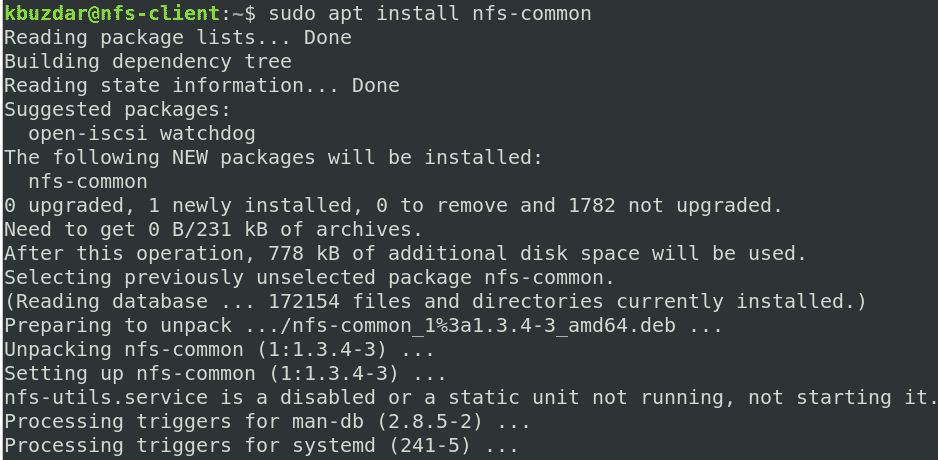
To mount share directories on the client machine, you must first install the NFS client package on it. On the client machine, run the following commands in the Terminal to install the NFS client package:

$ sudo apt update
$ sudo apt install nfs-common

Step 1: Create a Mount Point for the NFS Server’s Shared Directory

To make the NFS server’s shared directory available to the client, you will need to mount the NFS server’s directory on an empty directory on the client machine.

First, create an empty mount point directory on the client machine. This empty directory will serve as the mount point for the remote shared directories.

We have created the new mount directory “client_sharedfolder” under the /mnt directory using the following command:

$ sudo mkdir -p /mnt/client_sharedfolder

Step 2: Mount the NFS Server Shared Directory on the Client

Mount the NFS shared directory to the mount point directory on the client using the following syntax:

$ sudo mount [NFS _IP]:/[NFS_export] [Local_mountpoint]

Where:

  • NFS_IP is the NFS server’s IP address
  • NFS_export is the shared directory on the NFS server
  • Local_mountpoint is the mount point directory on the client’s system

Based on our setup, we ran the following command:

$ sudo mount 192.168.72.144:/mnt/sharedfolder /mnt/client_sharedfolder

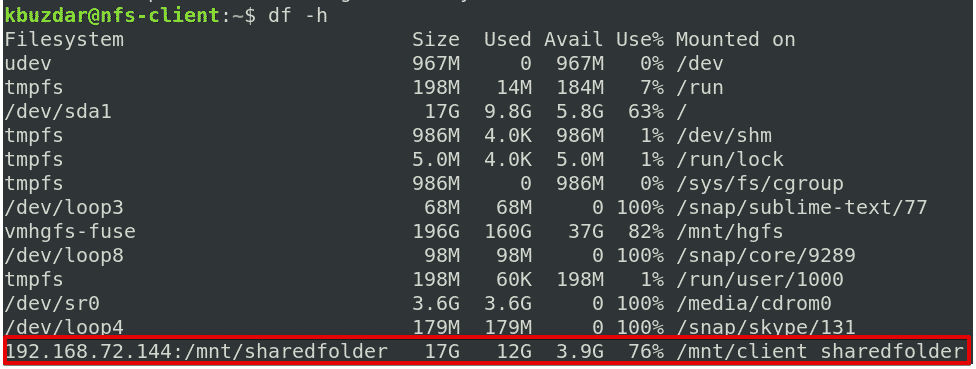
After mounting the NFS shared directory, you can confirm it using the following command in the Terminal:


$ df -h

Step 3: Test NFS share

Next, test the NFS share on the client machine. To perform a test create some files or directories under the NFS shared directory on the server machine and then access them from the client machine. Follow the procedure below to do this yourself:

1. On the NFS server machine, open the Terminal and use the cd command to navigate to the NFS shared directory:

$ cd /mnt/sharedfolder/

Next, create some test files:

$ sudo touch test1 test2 test3

2. On the NFS client machine, verify whether the same files exist in the local mount point directory.

$ ls /mnt/client_sharedfolder

Note that the mount command does not permanently mount the NFS file system on the mount point. You will have to mount it manually every time you reboot the system. In the next step, we will look at how to automatically mount the NFS file system at boot time.

Mounting an NFS File System Automatically

Automatically mounting an NFS file system saves you the trouble of having to manually mount the file system each time you boot your system. Below is the procedure to do so:

Edit the /etc/fstab file:

$ sudo nano /etc/fstab

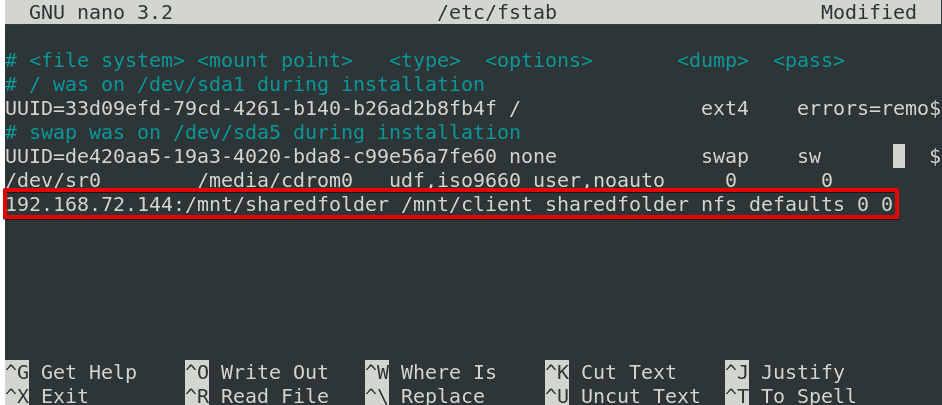
Next, add an entry in the /etc/fstab file, as follows:

NFS server:directory mountpoint nfs defaults 0 0

Where:

  • NFS server is the IP address of the NFS server
  • directory is the shared directory on the NFS server
  • mountpoint is the mount point on the NFS client’s machine
  • nfs defines the file system type

Based on our setup, we have added the following entry:

192.168.72.144:/mnt/sharedfolder /mnt/client_sharedfolder nfs defaults 0 0

After adding the above entry in the /etc/fstab file, save and exit the file by Ctrl + o and Ctrl + x, respectively.

The NFS share will be mounted automatically at the specified mount point the next time you boot your system.

Unmounting an NFS File System

You can easily unmount the NFS shared directory from your system if you no longer need it. To do so, type umount, followed by the name of the mount point, as follows:

$ sudo umount [mount_point]

Based on our setup, it would be:

$ umount /mnt/client_sharedfolder

Note: The command is “umount,” not unmount (there is no “n” present in the command).

Keep in mind that if you have added the entry in the /etc/fstab file for mounting the NFS, it will be automatically mounted again the next time you boot your system. If you want to prevent it from automatically mounting on the next boot, remove the entry from the /etc/fstab file.

Remember that if the NFS file system is busy, you cannot unmount it, such as if any files are opened on it or you are working on some directory.

There you have it! A simple procedure to mount and unmount the NFS share on the Debian 10 Buster system, both manually and automatically. I hope you liked the article!

Credits to: https://linuxhint.com/mount_nfs_share_debian/
Publicado em Dicas, Linux | Deixe o seu comentário

Full Fix: Error 0x80010108 in Windows 10/11

To fix various PC problems, we recommend Restoro PC Repair Tool:
This software will repair common computer errors, protect you from file loss, malware, hardware failure and optimize your PC for maximum performance. Fix PC issues and remove viruses now in 3 easy steps:

  1. Download Restoro PC Repair Tool that comes with Patented Technologies (patent available here).
  2. Click Start Scan to find Windows issues that could be causing PC problems.
  3. Click Repair All to fix issues affecting your computer’s security and performance
  • Restoro has been downloaded by 839,202 readers this month.

Computer errors can happen at any time, and speaking of errors, Windows 10 users reported a 0x80010108 error. This error appears while trying to update Windows Store apps, so let’s see how to fix this problem on Windows 10.

How to fix error 0x80010108 on Windows 10?

Table of contents:

Turn on User Account Control
Check your date and time
Clear the Windows Store Cache
Turn off the proxy
Turn off VPN
Clean the DNS cache
Reset Windows Store
Perform a Clean Boot
Perform the sfc scan
Disable your antivirus software
Re-register wups2.dll file
Restart Windows Update service
Install the latest version of Windows Essentials
Uninstall latest Windows updates
Run the Update troubleshooter
Run DISM

Fix Windows 10 Store error 0x80010108

Solution 1 – Turn on User Account Control

User Account Control is a security feature of Windows 10 that notifies you when you or any other application tries to perform certain action that requires administrator privileges. Many users tend to turn off this feature due to its frequent notifications, but it seems that you can fix error 0x80010108 by turning on User Account Control. To turn this feature on, follow these steps:

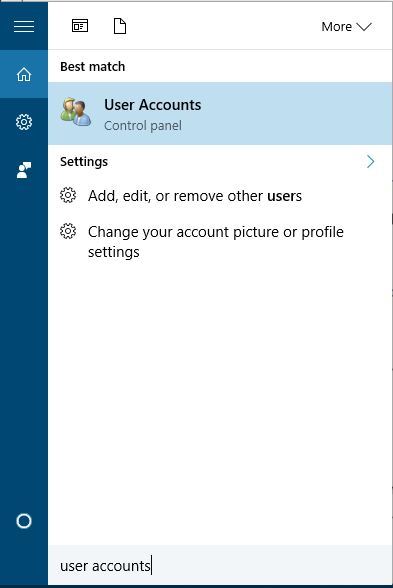
  1. Press Windows Key + S and enter user accounts. Select User accounts from the menu.
    0x80010108-user-accounts
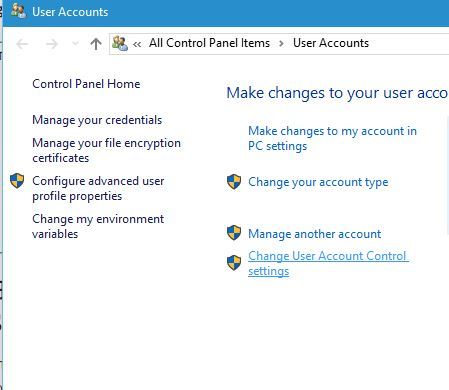
  2. Click the Change User Account Control settings.
    0x80010108-change-user
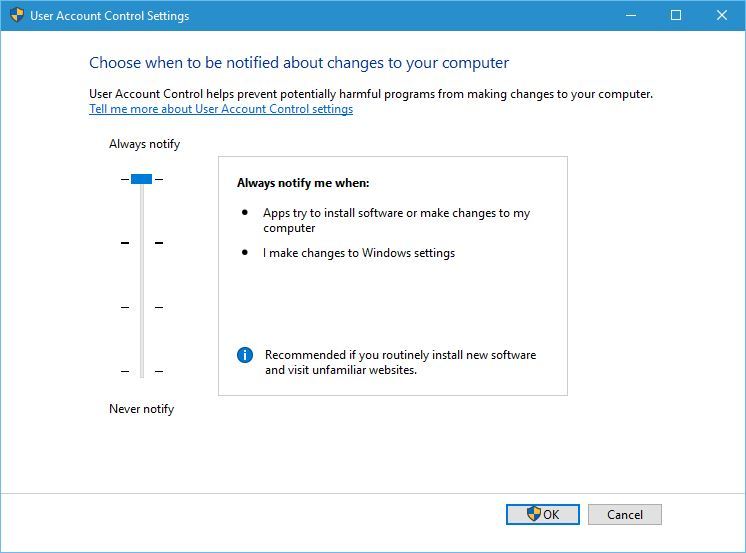
  3. Move the slider all the way up to the Always Notify. Click OK to save changes.
    0x80010108-always

Solution 2 – Check your date and time

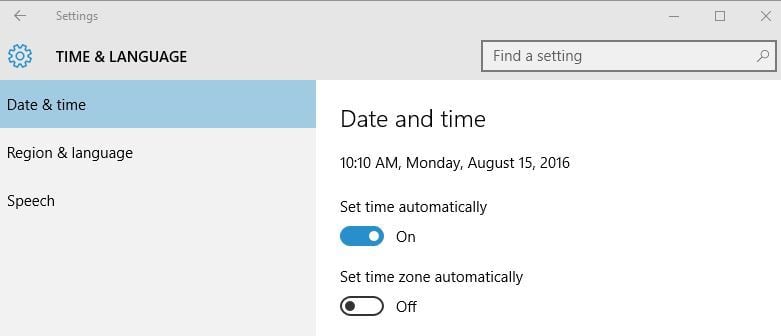
Sometimes these problems can occur if your date or time are incorrect. Incorrect date and time can occur due to broken motherboard battery, and if you’re getting error 0x80010108 we advise you to check your time and date. If date or time is wrong, do the following:

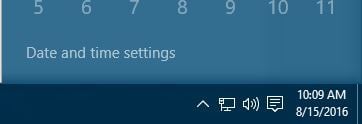
  1. Click the clock in the bottom right corner. Choose Date and time settings.
    0x80010108-date
  2. Turn Set time automatically option off and then turn it back on. This should automatically fix your time and date.
    0x80010108-time

Solution 3 – Clear the Windows Store Cache

This is a simple procedure, and you can do it by following these steps:

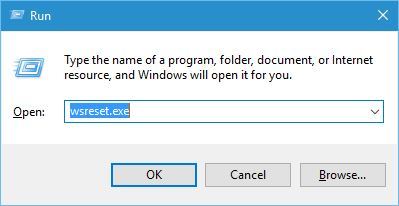
  1. Press Windows Key + R and enter wsreset.exe.
    0x80010108-wsreset
  2. Wait for the process to complete and check if the problem is resolved.

Many Windows Store problems can be fixed simply by resetting the cache, so be sure to try this solution.

Solution 4 – Turn off proxy

According to users, this error can occur if you’re using proxy, therefore be sure to turn it off. To do that, follow these steps:

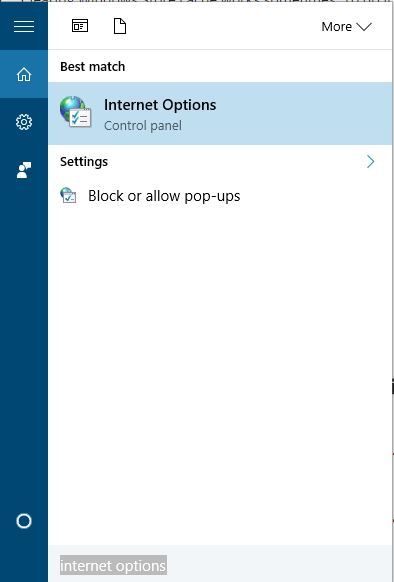
  1. Press Windows Key + S and enter internet options. Select Internet Options from the menu.
    0x80010108-internet-options
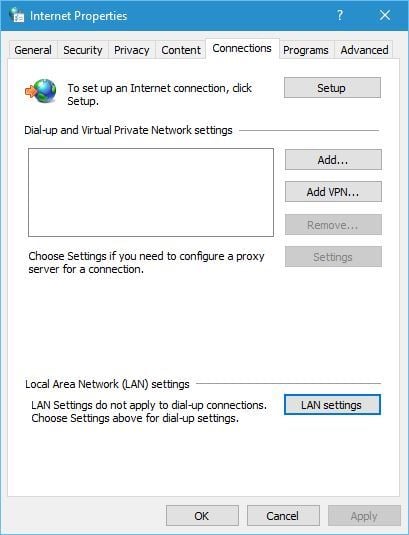
  2. Go to Connections tab and click on LAN settings.
    0x80010108-LAN-settings
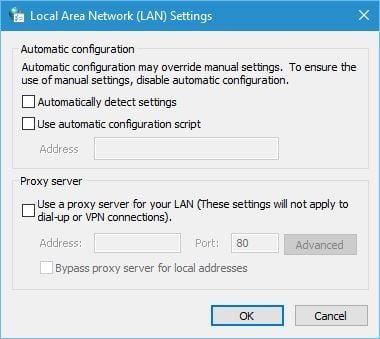
  3. When settings window opens, uncheck Automatically detect settings and Use a proxy server for your LAN options. Click OK to save changes.
    0x80010108-proxy-1

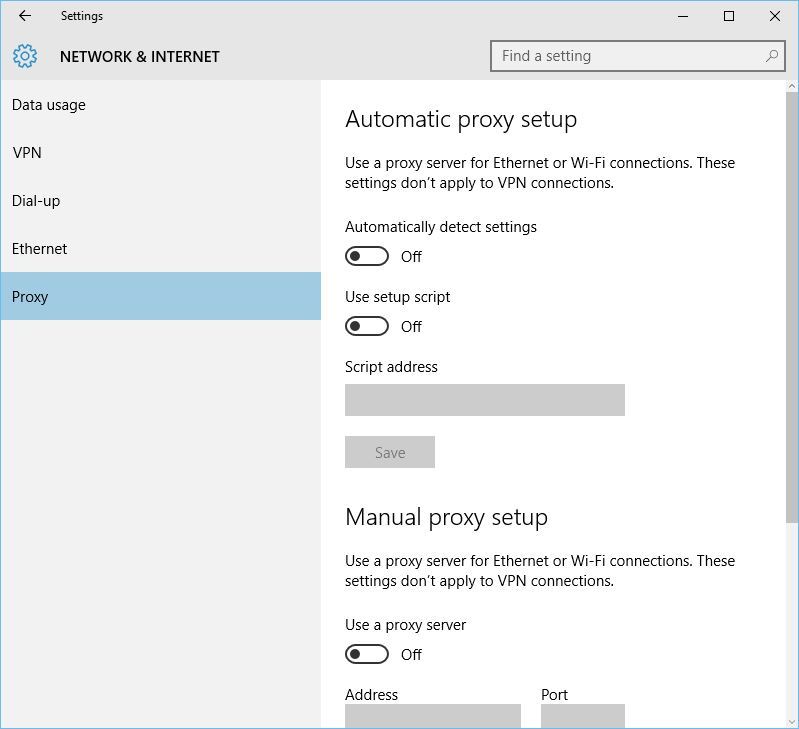
You can also do the same thing with Settings app. To turn off proxy using the Settings app, follow these steps:

  1. Open the Settings app and go to Network & Internet section.
  2. Go to the Proxy tab and turn off Automatically detect settings and Use Proxy server options.
    0x80010108-off

Solution 5 – Turn off VPN

VPN software is great if you want to protect your privacy online or bypass certain limitations, but sometimes VPN software can cause 0x80010108 error to appear. To fix this problem, it’s recommended that you disable VPN software on your PC. If that doesn’t work, you might have to remove all installed VPN clients and check if that fixes the problem.

Solution 6 – Clean the DNS cache

In some cases your DNS can cause 0x80010108 error, and to fix this issue you need to clear the DNS cache. To do that, follow these steps:

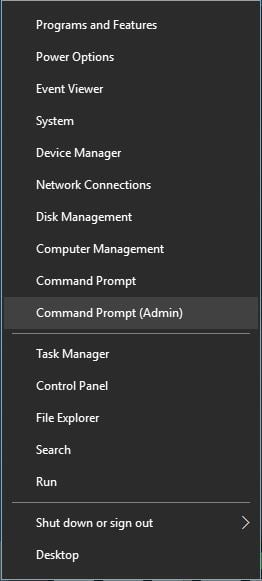
  1. Open Command Prompt as administrator. To do that, press Windows Key + X to open Power User Menu and choose Command Prompt (Admin).
    0x80010108-admin
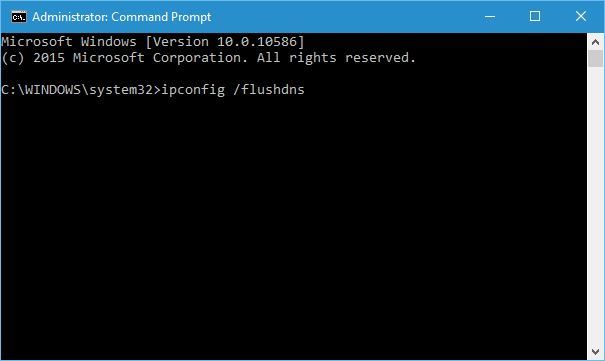
  2. When Command Prompt opens, enter ipconfig /flushdns and press Enter.
    0x80010108-flushdns
  3. After the process is completed, close Command Prompt and check if the issue is resolved.

Solution 7 – Reset Windows Store 

The next thing we’re going to try is also one of the most common solutions for Store-related problems. And that’s, of course, resetting the Store. To reset the Microsoft Store, all you have to do is to run one command. And here’s how to do that:

  1. Go to Search, type wsreset, and open the WSReset.exe script.
  2. Wait for the script to finish loading and restart your computer.

Solution 8 – Perform a Clean Boot

Third-party applications and services can sometimes interfere with Windows Store and cause various problems, therefore, you might want to perform a Clean Boot. To do that, follow these steps:

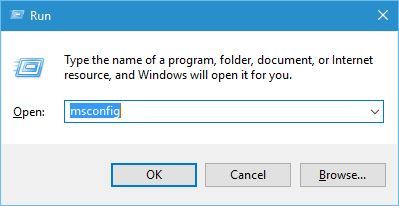
  1. Press Windows Key + R and enter msconfig.
    0x80010108-msconfigf
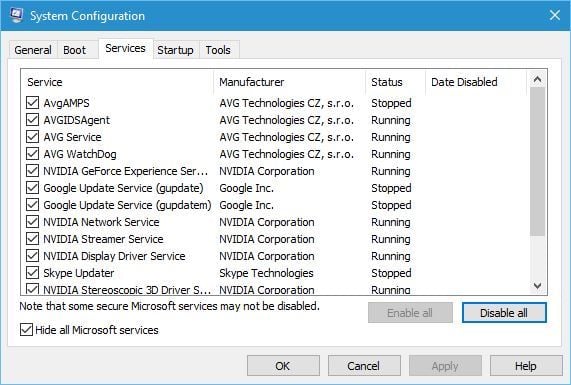
  2. When System Configuration window opens, go to Services tab and check Hide all Microsoft services. After that click the Disable all button.
    0x80010108-disable-all
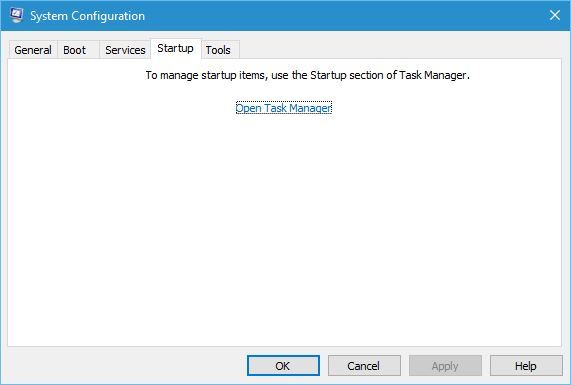
  3. Go to Startup tab and click Open Task Manager.
    0x80010108-open-task-manager
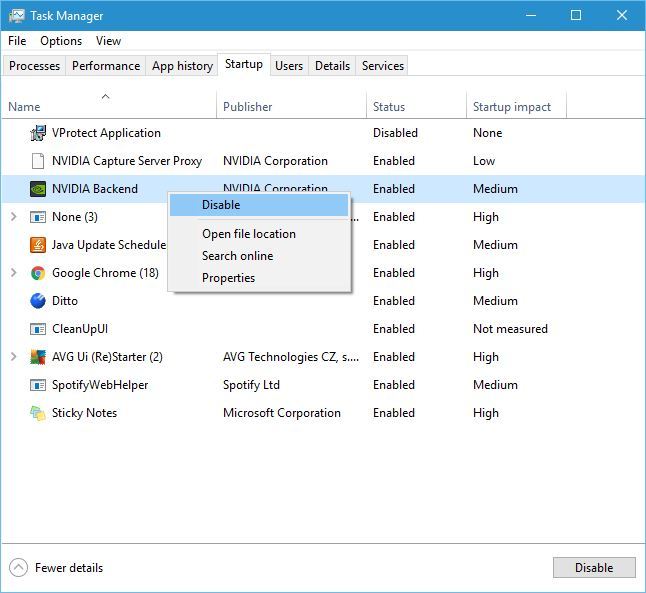
  4. When Task Manager opens, select each Startup application, right click it and choose Disable. After disabling all applications close Task Manager and click Apply and OK in System Configuration window.
    0x80010108-disable
  5. Restart your PC and check if the problem is resolved.

Expert Tip: Some PC issues are hard to tackle, especially when it comes to corrupted repositories or missing Windows files. If you are having troubles fixing an error, your system may be partially broken. We recommend installing Restoro, a tool that will scan your machine and identify what the fault is.
Click here to download and start repairing.

If the problem is fixed, it means that one of the third-party applications was causing it. To find which application caused this problem, repeat the same steps, but be sure to enable applications and services one by one until you find the one that is causing this issue.

Solution 9 – Perform the sfc scan

This error might appear if your installation is corrupt, and in order to fix it, you need to run sfc scan. To do that, follow these steps:

  1. Open Command Prompt as administrator.
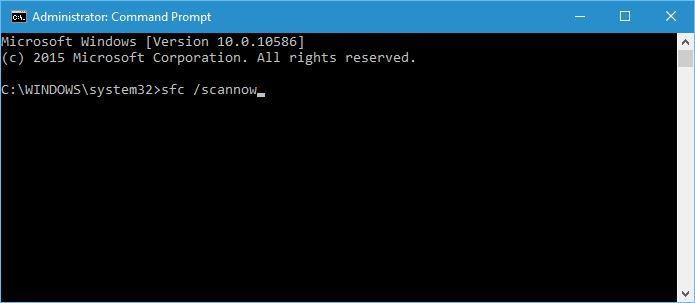
  2. When Command Prompt opens, enter sfc /scannow and press Enter.
    sfc-scan
  3. Wait for the process to complete.

Solution 10 – Disable your antivirus software

Sometimes third-party antivirus software can interfere with Windows Store and cause all sorts of problems, therefore it’s recommended that you try disabling your antivirus tool. Bear in mind that almost any antivirus software can cause this issue to appear, therefore be sure to disable all third-party antivirus tools that you have installed. If disabling the antivirus doesn’t help, we suggest that you temporarily uninstall it and see if that fixes the problem. If you’re concerned about your safety, you should know that Windows 10 comes with Windows Defender pre-installed, so your PC won’t be completely defenseless.

Solution 11 – Re-register wups2.dll file

According to users, you can fix error 0x80010108 by re-registering wups2.dll. To do that, follow these steps:

  1. Start Command Prompt as administrator.
  2. Enter the following lines and be sure to press Enter after each line in order to execute it:
    • net stop wuauserv
    • regsvr32 %windir%system32wups2.dll
    • net start wuauserv
  3. Close Command Prompt and check if the problem is resolved.

Solution 12 – Restart Windows Update service

Few users reported that restarting the Windows Update service fixed the problem for them, and to do that, you need to follow these steps:

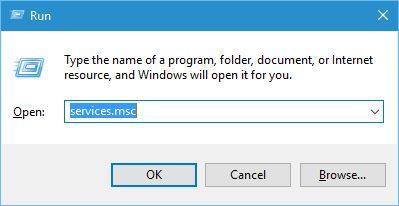
  1. Press Windows Key + R and enter services.msc.
    0x80010108-services
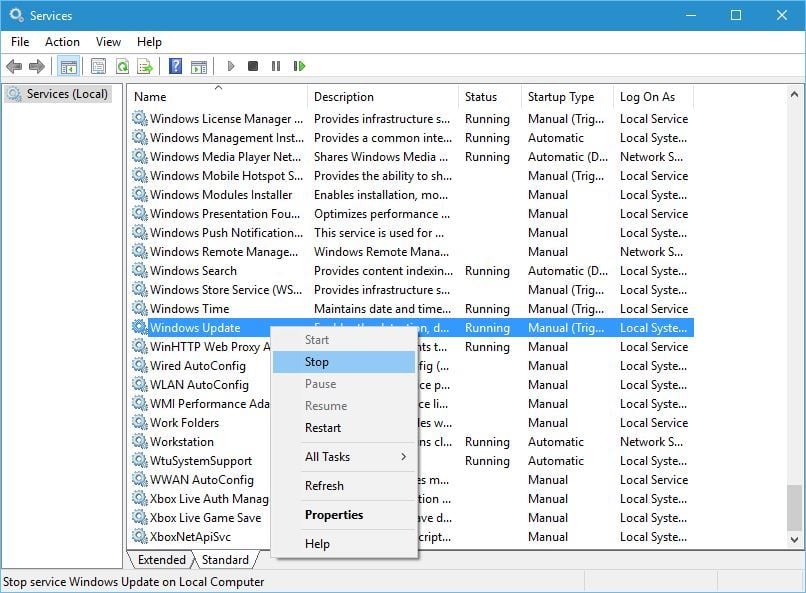
  2. When Services window opens, locate Windows Update service, right click it and choose Stop.
    0x80010108-stop
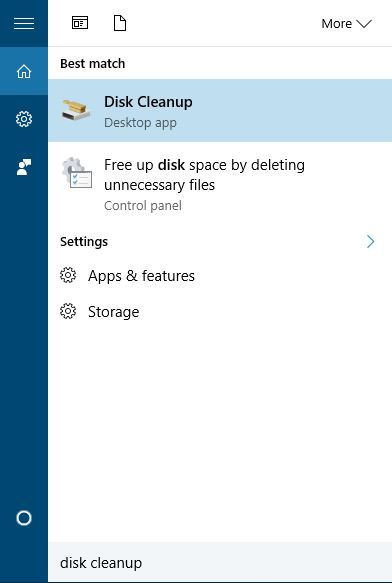
  3. Don’t close Services window. Press Windows Key + S and enter disk cleanup. Select Disk Cleanup from the menu.
    0x80010108-disk-cleanup
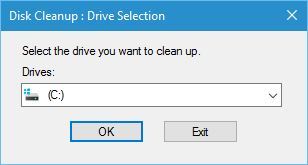
  4. Select your default partition, in our case it’s C, and click OK.
    0x80010108-cleanup-drive
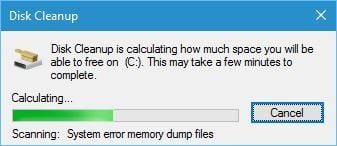
  5. Wait until Disk Cleanup scans your C drive.
    0x80010108-scan
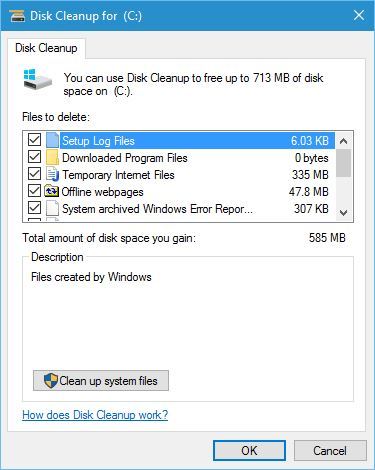
  6. Select the types of files you want to remove. In our case we selected all types of files.
  7. After you’re done, click the OK button to clean the files.
    0x80010108-ok-clean
  8. After the cleaning process is completed, go back to Services window, right click Windows Update service and choose Enable from the menu.
  9. Try to download the latest updates again.

Solution 13 – Install the latest version of Windows Essentials

Sometimes this error can be caused by other applications, especially if you have Windows Essentials installed. To fix this problem it’s advised that you remove Windows Essentials from your PC and install the latest version.

Solution 14 – Uninstall latest Windows updates

There’s also a possibility that some Windows Update actually disrupted the Store. If you suspect that might be the case, go on and delete the troublesome update. Here’s how to do that:

  1. Press Windows Key + I to open the Settings app.
  2. Once the Settings app opens, navigate to Update & security section.
  3. Go to Windows Update tab and click on Update history.
  4. Click on Uninstall updates.
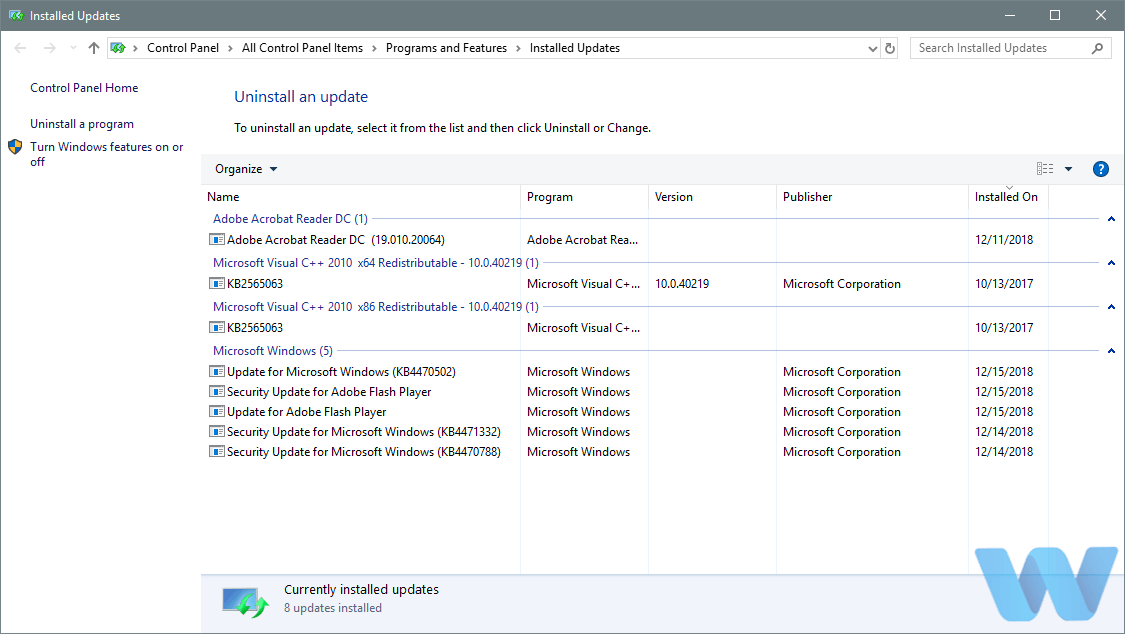
  5. List of installed updates will now appear. Select the problematic update that you want to remove and click the Uninstall button.
  6. After removing the update, restart your PC.

Solution 15 – Run the Update troubleshooter

Windows 10 also features its own troubleshooting tool. This tool can be used for dealing with all sorts of issues, including the probems with Windows Store apps and the Store itself. So, if none of the previous solutions resolved the issue, try running the troubleshooter.

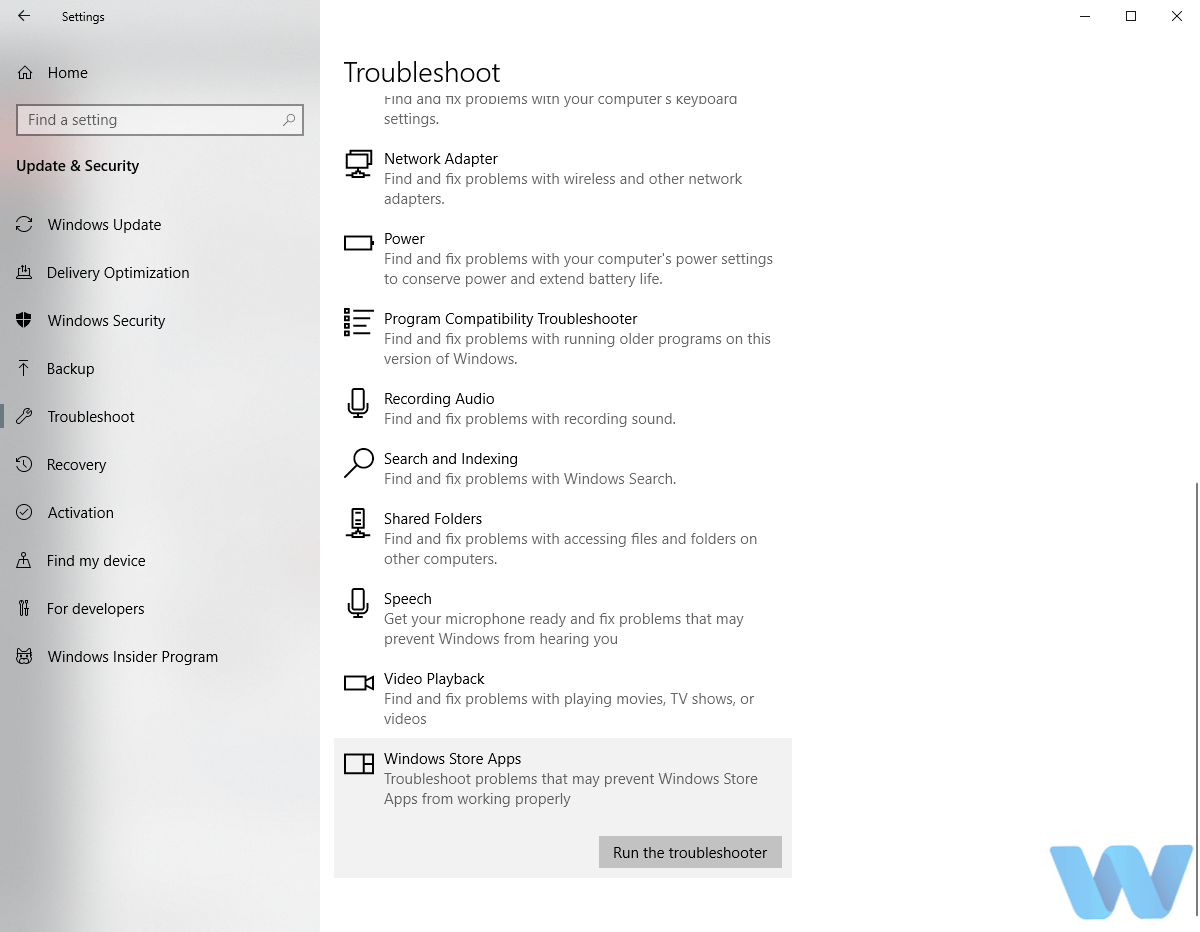
Here’s how to run Windows 10 troubleshooter:

  1. Open the Settings app and go to Update & Security section.
  2. Select Troubleshoot from the menu on the left.
  3. Select Windows Store Apps from the right pane and click Run the troubleshooter.
  4. Follow the instructions on the screen to complete the troubleshooter.

Solution 16 – Run DISM

And finally, if none of the previous solutions resolved the problem, let’s re-deploy the system image using the DISM (Deployment Image Servicing and Management) tool. Hopefully, this tool will resolve the problem for good.

We’ll walk you through both standard and the procedure that utilizes the installation media below:

  • Standard way
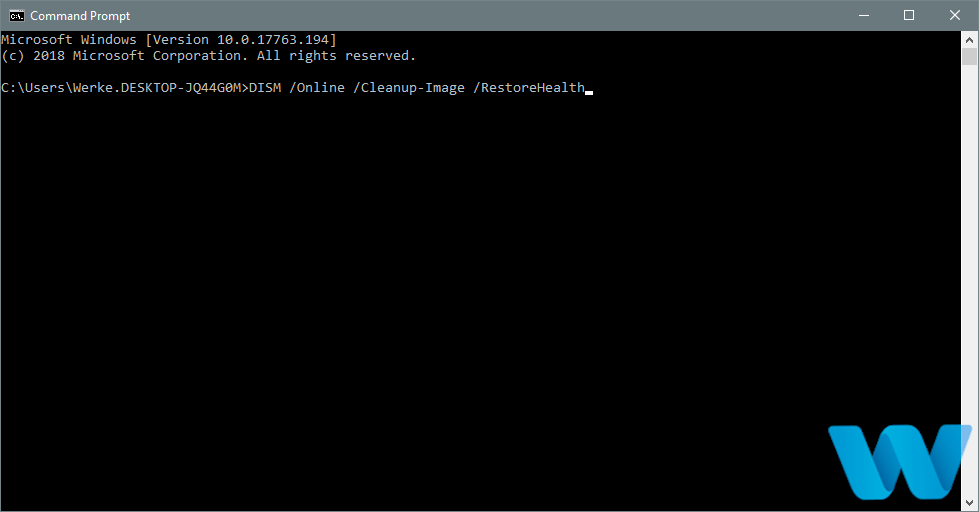
  1. Right-click Start and open Command Prompt (Admin).
  2. Paste the following command and press Enter:
      • DISM /Online /Cleanup-Image /RestoreHealth
  3. Wait until the scan is finished.
  4. Restart your computer and try updating again.
  • With the Windows installation media
  1. Insert your Windows installation media.
  2. Right-click the Start menu and, from the menu, choose the Command Prompt (Admin).
  3. In the command line, type the following commands and press Enter after each:
    • dism /online /cleanup-image /scanhealth
    • dism /online /cleanup-image /restorehealth
  4. Now, type the following command and press Enter:
    • DISM /Online /Cleanup-Image /RestoreHealth /source:WIM:X:SourcesInstall.wim:1 /LimitAccess
  5. Make sure to change an X value with the letter of the mounted drive with Windows 10 installation.
  6. After the procedure is finished, restart your computer.

Error 0x80010108 can cause problems while updating Windows Store apps, but it can sometimes affect other applications as well. This error can be troublesome, but we hope that you fixed it by using one of the solutions from this article.

Publicado em Dicas, Windows | Deixe o seu comentário